Discover the estate
Discover observed AI products, provider accounts, MCP installations and tool revisions.
Runtime AI Governance with inventory, gateway controls, approvals, cases, and evidence.
3LS brings AI and MCP inventory, gateway controls, policy approvals, cases and audit evidence into one platform. Discover observed AI use, control supported AI and tool workflows, and give operators evidence to review and respond.
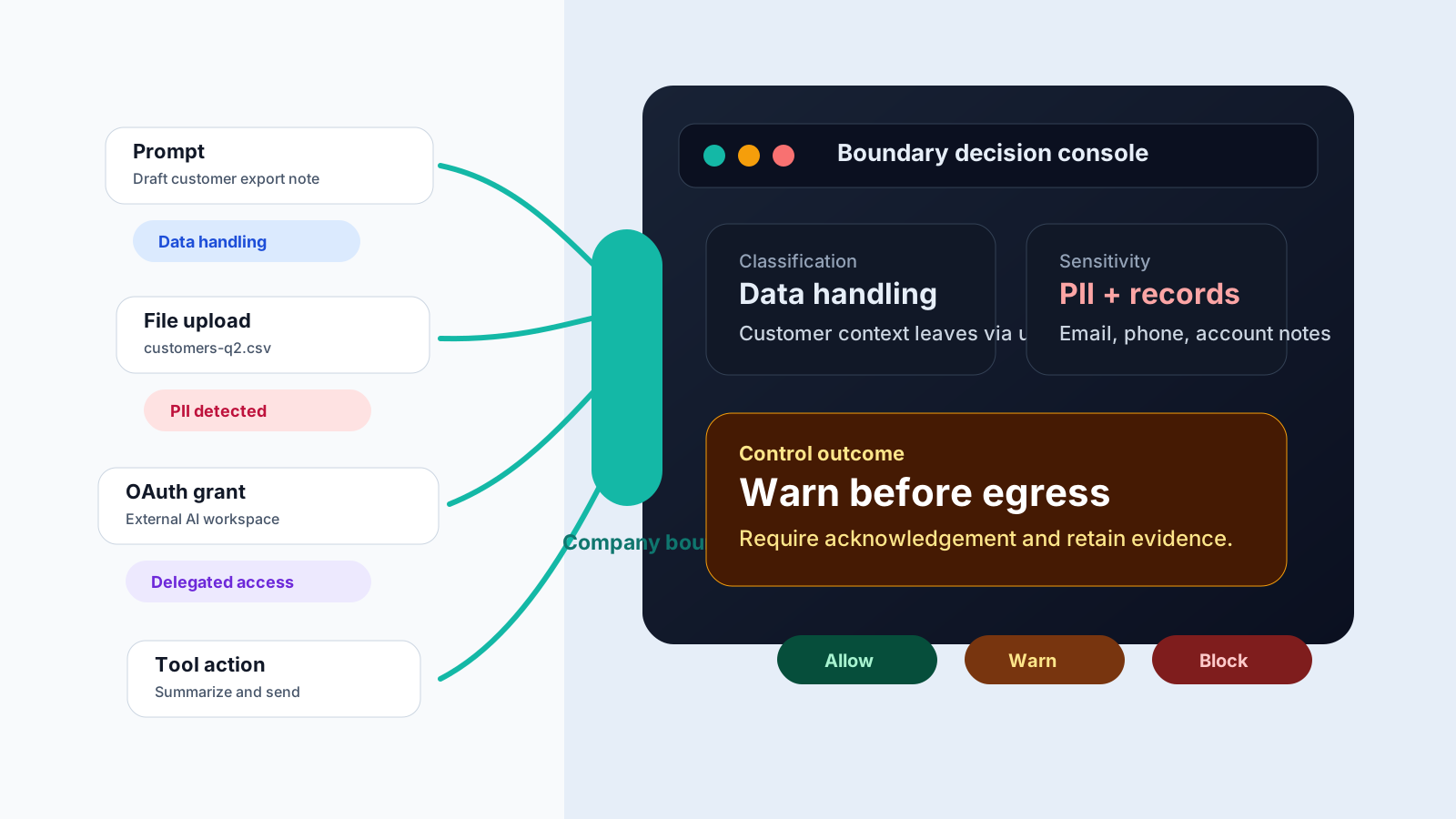
Discover observed AI products, provider accounts, MCP installations and tool revisions.
Apply configured policy on supported traffic routed through the gateway and supported browser and managed MCP paths.
Assign case owners, retain remediation evidence and review attributable decisions.
How it works
Instead of treating AI as a black box, 3LS helps teams understand how AI is being used, where sensitive data is involved, and how organisational policy applies.
Available evidence shows where a user, assistant, OAuth app, or tool is using AI.
3LS classifies what the interaction appears to be for and how the AI is being used.
Sensitive content and risky behaviour are surfaced for evaluation.
Teams evaluate the available context and risk against organisational policy, then retain the result.
What the story answers
Prompt classification answers how your users are using AI. Sensitive-content detection answers what information is present. Policy evaluation answers what the available evidence means.
Prompt classification
Classify drafting, coding, research, data handling, and tool-driven behavior into clear operating patterns.
PII detection
Highlight personal information, secrets, and restricted content inside prompts, tool inputs, and outputs.
Policy evaluation
Evaluate the available context against organisational policy and keep the reasoning operators need to review.
Illustrative operator view
Give security teams a readable trail of what was detected, how policy was evaluated, and which evidence supported the result.
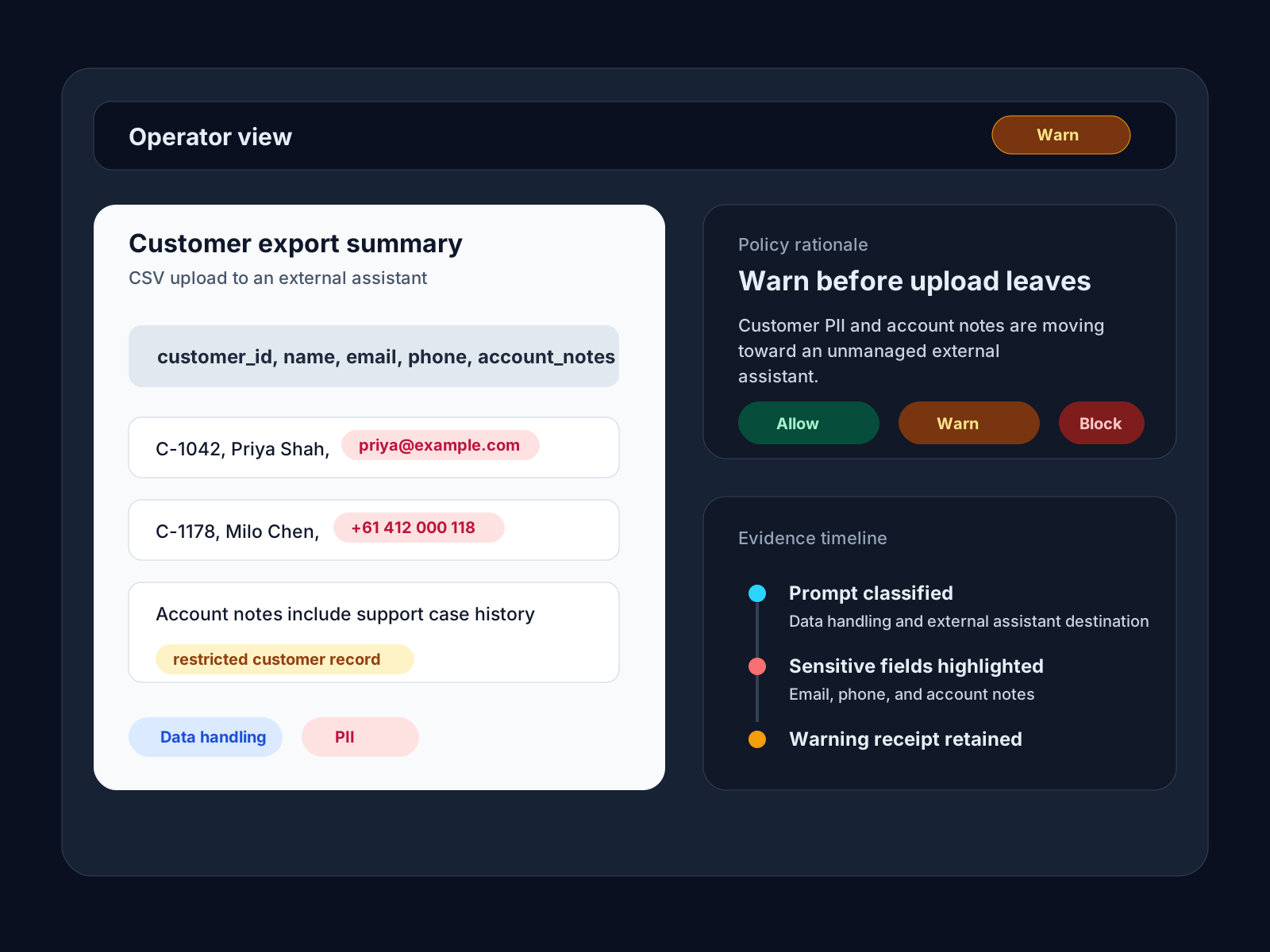
Illustrative findings
Activity class, sensitivity, and policy evaluation
Solutions
Explore the five capability groups in the 3LS Platform, from inventory and governed access to operator response and evidence.
AI and MCP Inventory
Discover observed AI products, provider accounts, MCP installations and tool revisions. Track ownership, provenance and observation freshness.
Explore capabilityAI Gateway Controls
Apply policy to approved providers, models and tool groups. Inspect selected text and control usage on supported traffic routed through the gateway.
Explore capabilityPolicy and Approvals
Validate and publish signed policies, track their application, and manage scoped exceptions with approval and expiry.
Explore capabilityRisk and Response
Prioritise findings, assign case owners and retain evidence of remediation.
Explore capabilityGovernance Evidence
Review attributable policy decisions, activity and case history. Export observed inventory for governance and assurance reviews.
Explore capabilityAI Gateway / 3LS Platform
Four capabilities work on supported gateway paths, from selected prompts and eligible models to usage controls and tool proposals before harness delivery.
Check model-proposed tool calls and selected arguments before release to the client runtime on configured protected response paths.
Use selected-text topic/activity labels and separate risk signals in configured policy decisions.
Select among approved, eligible models using policy, configured classification outcomes and permitted user or session choices.
Review attributable usage and cost, request-rate controls and eventual monthly thresholds with reporting freshness.
Compliance and Assurance
Use inventory, signed policies, approvals, activity and remediation records to support governance reviews. Combine product records with organisational assessments, policy, competence and supplier diligence.
Map your governance questions to product evidence →From the blog
A few articles that explain the operating model behind the product: where AI use becomes visible, why incidents expand, and how control decisions should be made.

AI chat feels private to users, but providers and operators control storage, sharing, indexing, and transcript exposure. That makes chat security a governance and data-exposure problem.
After an AI exposure, the hardest question is usually what your organization cannot answer: where AI is active, what was pasted in, and what was shared. That visibility gap turns shadow AI into an incident multiplier.

Microsoft is adding native AI controls while OpenAI is turning ChatGPT into a shared agent workspace. Both trends point to the same requirement: one runtime governance layer across prompts, files, memory, tools, and actions.
Start with visibility, move to clear findings, and introduce controls only where they matter.